21. HPM_MONITOR + ADC High-Performance Data Monitoring Solution
21.1. Depend on SDK1.11.0
21.2. Introduction
-This solution demonstrates how to achieve high-performance ADC sampling on Xianji Semiconductor MCU microcontrollers, transmitting data in real-time to a PC host via the hpm_monitor service for waveform display and analysis.
-The HPM6300 series supports three 16-bit ADC converters capable of converting analog signals from external pins and internal chip sources. When set to 16-bit resolution, the ADC achieves a maximum sampling rate of 2 MSPS; at 12-bit resolution, the maximum sampling rate reaches 4 MSPS. The ADC supports read conversion mode, cyclic conversion mode, sequential conversion mode, and interrupt conversion mode.
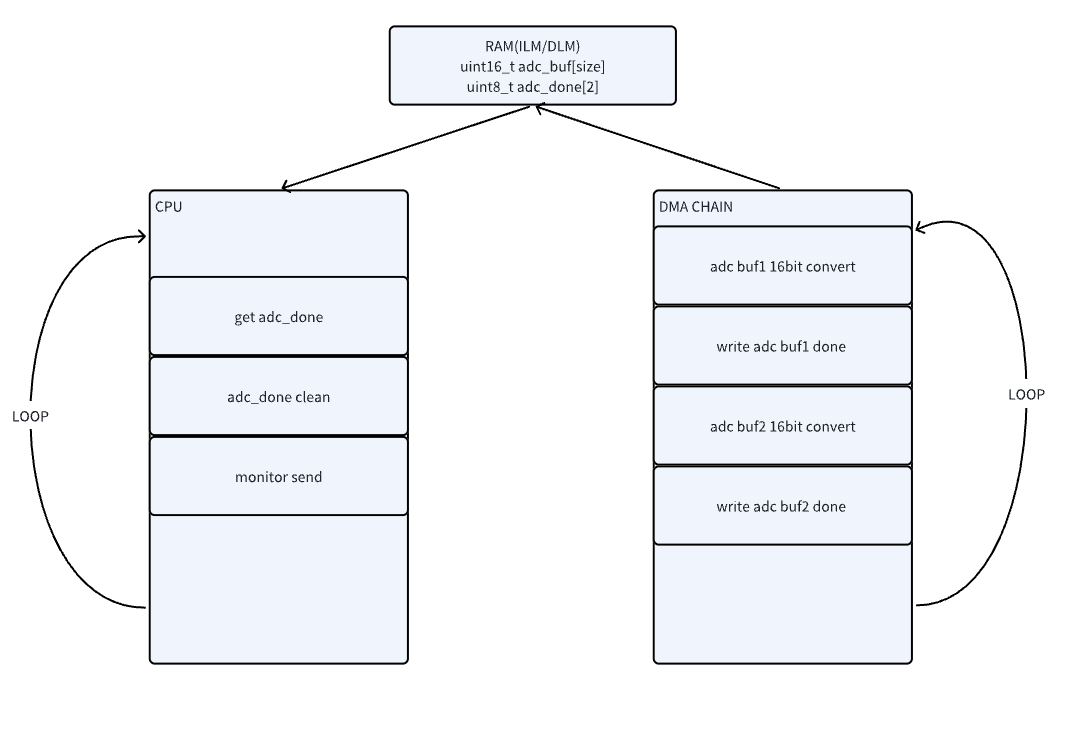
-This solution uses the HPM6300 development board as an example to demonstrate how to implement high-speed ADC sampling. It transmits the sampled data in real-time to the HPMicroMonitorStudio tool on a PC via the hpm_monitor service for waveform display. The solution employs interrupt-triggered conversion mode with PWM triggering and utilizes DMA for automatic data transfer, achieving efficient data acquisition and transmission.
21.3. Features of the Solution
High-Performance Data Acquisition:
Supports 16-bit ADC sampling up to 2MSPS
Utilizes PWM triggering for precise, controllable sampling timing
DMA-automated data transfer with zero CPU intervention
Real-Time Data Monitoring:
Transmits ADC data in real-time via hpm_monitor service
Supports USB, UART, and ENET communication interfaces
Low-latency, high-bandwidth data transmission
Flexible Data Processing:
Supports multiple sampling modes (Notify/Stream/Buffer)
Customizable data reporting frequency and format
Supports multi-channel monitoring
User-Friendly:
Real-time waveform display via PC graphical interface
Parameters adjustable in real time
21.4. Block Diagram and Call Flow
21.5. Hardware Configuration
Development Board Support Supports the full range of HPM EVK development boards. Currently validated with HPM6300EVK; other EVKs require manual program or pin adjustments.
Communication Interface Selection
ENET TCP: Suitable for direct network connection with the PC host tool
USB CDC: High bandwidth and convenient connectivity
UART: Optional, supports up to 10Mbps baud rate
21.6. Software Configuration
Engineering Configuration (CMakeLists.txt)
# Copyright (c) 2021 HPMicro
# SPDX-License-Identifier: BSD-3-Clause

cmake_minimum_required(VERSION 3.13)

set(APP_VERSION_STRING "\"1.10.0\"")

set(RV_ARCH "rv32imafc")
set(RV_ABI "ilp32f")

# set(SES_TOOLCHAIN_VARIANT "Andes")
# set(CONFIG_HPM_MATH 1)
# set(CONFIG_HPM_MATH_DSP 1)
# set(HPM_MATH_DSP_SES_LIB "libdspf")


set(CONFIG_A_HPMMONITOR 1)
# set(CONFIG_MONITOR_INTERFACE "uart")
# set(CONFIG_MONITOR_INTERFACE "usb")
set(CONFIG_MONITOR_INTERFACE "enet")

if("${CONFIG_MONITOR_INTERFACE}" STREQUAL "uart")

elseif("${CONFIG_MONITOR_INTERFACE}" STREQUAL "usb")
    set(CONFIG_CHERRYUSB 1)
    set(CONFIG_USB_DEVICE 1)
    set(CONFIG_USB_DEVICE_CDC 1)
elseif("${CONFIG_MONITOR_INTERFACE}" STREQUAL "enet")
    set(CONFIG_LWIP 1)
    set(CONFIG_ENET_PHY 1)
    set(APP_USE_ENET_PORT_COUNT 1)
    #set(APP_USE_ENET_ITF_RGMII 1)
    #set(APP_USE_ENET_ITF_RMII 1)
    #set(APP_USE_ENET_PHY_DP83867 1)
    #set(APP_USE_ENET_PHY_RTL8211 1)
    #set(APP_USE_ENET_PHY_DP83848 1)
    set(APP_USE_ENET_PHY_RTL8201 1)
    if(NOT DEFINED APP_USE_ENET_PORT_COUNT)
        message(FATAL_ERROR "APP_USE_ENET_PORT_COUNT is undefined!")
    endif()

    if(NOT APP_USE_ENET_PORT_COUNT EQUAL 1)
        message(FATAL_ERROR "This sample supports only one Ethernet port!")
    endif()

    if (APP_USE_ENET_ITF_RGMII AND APP_USE_ENET_ITF_RMII)
        message(FATAL_ERROR "This sample doesn't support more than one Ethernet phy!")
    endif()
endif()

find_package(hpm-sdk REQUIRED HINTS $ENV{HPM_SDK_BASE})

sdk_ld_options("-lm")
# sdk_compile_options("-O2")

if("${CONFIG_MONITOR_INTERFACE}" STREQUAL "uart")
    sdk_compile_definitions("-DCONFIG_UART_CHANNEL=1")
    sdk_compile_definitions("-DCONFIG_USE_CONSOLE_UART=1")
    sdk_compile_definitions("-DCONFIG_MONITOR_DBG_LEVEL=0")
elseif("${CONFIG_MONITOR_INTERFACE}" STREQUAL "usb")
    sdk_compile_definitions("-DCONFIG_USB_CHANNEL=1")
elseif("${CONFIG_MONITOR_INTERFACE}" STREQUAL "enet")
    sdk_compile_definitions("-DCONFIG_ENET_CHANNEL=1")
    sdk_inc(inc/enet)
endif()

sdk_compile_definitions("-DHPM_MONITOR_ENABLE=1")

project(hpm_monitor_adc)

sdk_inc(../common/adc)
sdk_inc(inc)
sdk_inc(inc/config)

sdk_app_src(src/main.c)
sdk_app_src(../common/adc/adc_16_pmt.c)

add_subdirectory(../../../../ hpm_apps/build_tmp)

generate_ses_project()
MONITOR Config (monitor_config.h)
#define MONITOR_PID                  (0xFFFF)
#define MONITOR_VID                  (0x34B7) /* HPMicro VID */

#define MONITOR_PROFILE_MAXSIZE      (4096)

#define MONITOR_MEM_SIZE             (10*1024)

/*--------monitor log--------*/
#define CONFIG_MONITOR_PRINTF(...) printf(__VA_ARGS__)

#ifndef CONFIG_MONITOR_DBG_LEVEL
#define CONFIG_MONITOR_DBG_LEVEL MONITOR_DBG_INFO
#endif

#if defined(CONFIG_UART_CHANNEL) && CONFIG_UART_CHANNEL

#define MONITOR_UART_DMA_ENABLE

#ifndef CONFIG_USE_CONSOLE_UART
#define MONITOR_UART_BASE            HPM_UART2
#define MONITOR_UART_CLK_NAME        clock_uart2
#define MONITOR_UART_IRQ             IRQn_UART2
#define MONITOR_UART_BAUDRATE        (2000000UL)//(115200UL)

#ifdef MONITOR_UART_DMA_ENABLE
#define MONITOR_UART_TX_DMA_REQ        HPM_DMA_SRC_UART2_TX
#define MONITOR_UART_RX_DMA_REQ        HPM_DMA_SRC_UART2_RX
#endif

#else
#define MONITOR_UART_BASE            BOARD_CONSOLE_UART_BASE
#define MONITOR_UART_CLK_NAME        BOARD_CONSOLE_UART_CLK_NAME
#define MONITOR_UART_IRQ             BOARD_CONSOLE_UART_IRQ
#define MONITOR_UART_BAUDRATE        BOARD_CONSOLE_UART_BAUDRATE

#ifdef MONITOR_UART_DMA_ENABLE
#define MONITOR_UART_TX_DMA_REQ      BOARD_CONSOLE_UART_TX_DMA_REQ
#define MONITOR_UART_RX_DMA_REQ      BOARD_CONSOLE_UART_RX_DMA_REQ
#endif
#endif

#ifdef MONITOR_UART_DMA_ENABLE
#define MONITOR_UART_DMA_CONTROLLER    HPM_HDMA
#define MONITOR_UART_DMAMUX_CONTROLLER HPM_DMAMUX
#define MONITOR_UART_TX_DMA_CHN        (0U)
#define MONITOR_UART_RX_DMA_CHN        (1U)
#define MONITOR_UART_TX_DMAMUX_CHN     DMA_SOC_CHN_TO_DMAMUX_CHN(MONITOR_UART_DMA_CONTROLLER, MONITOR_UART_TX_DMA_CHN)
#define MONITOR_UART_RX_DMAMUX_CHN     DMA_SOC_CHN_TO_DMAMUX_CHN(MONITOR_UART_DMA_CONTROLLER, MONITOR_UART_RX_DMA_CHN)
#define MONITOR_UART_DMA_IRQ           IRQn_HDMA
#endif

#endif

#if defined(CONFIG_USB_CHANNEL) && CONFIG_USB_CHANNEL

#define CONFIG_USB_POLLING_ENABLE

#include "usb_config.h"
#define MONITOR_USB_BASE             CONFIG_HPM_USBD_BASE
#define MONITOR_USB_BUSID            0
#define MONITOR_USB_IRQ              CONFIG_HPM_USBD_IRQn
#define MONITOR_USB_PRIORITY         2

#endif
21.7. Core Code Implementation
Define the trigger source PWM for the ADC and the interconnect manager used.
#define BOARD_APP_ADC16_PMT_PWM         HPM_PWM0
#define BOARD_APP_ADC16_PMT_TRGM        HPM_TRGM0
#define BOARD_APP_ADC16_PMT_TRGM_IN     HPM_TRGM0_INPUT_SRC_PWM0_CH8REF
#define BOARD_APP_ADC16_PMT_TRGM_OUT    TRGM_TRGOCFG_ADCX_PTRGI0A
Define the ADC sampling rate and the data length per transmission.
#define APP_ADC16_DMA_BUFF_LEN_IN_BYTES   (1024U)
#define APP_ADC16_TCP_SEND_SIZE           (APP_ADC16_DMA_BUFF_LEN_IN_BYTES*sizeof(uint16_t))
User-Defined Channel Definition
MONITOR_DEFINE_GLOBAL_VAR(adc_ch, 0, uint16_t, ADC_SAMPLE_FREQ, APP_ADC16_DMA_BUFF_LEN_IN_BYTES);
MONITOR sends ADC samples
static void monitor_adc_handle(void)
{
    if (adc_get_done(0) && adc_get_done(1))
    {
        printf("adc dual buff full up!\r\n");
    }
    if (adc_get_done(0) && monitor_report_ch_is_released(0))
    {
        adc_clear_done(0);
        monitor_channel_report_array(0, adc_get_buf_addr_point(0), APP_ADC16_DMA_BUFF_LEN_IN_BYTES);
    }
    else if (adc_get_done(1) && monitor_report_ch_is_released(0))
    {
        adc_clear_done(1);
        monitor_channel_report_array(0, adc_get_buf_addr_point(1), APP_ADC16_DMA_BUFF_LEN_IN_BYTES);
    }
}
DEMO Example
int main(void)
{
    board_init();
    printf("monitor adc demo!\r\n");
    printf("__DATE__:%s, __TIME__:%s\r\n", __DATE__, __TIME__);

    monitor_init();

    adc_pmt_auto_config(ADC_SAMPLE_FREQ);
    while (1)
    {
        monitor_adc_handle();
        monitor_handle();
    }
    return 0;
}
21.8. Project Path
Project Path:monitor_adc/software/hpm_monitor
21.9. Engineering Construction
Building projects on Windows

Linux Project Build and Compilation
    //Switch to the sample application directory
    cd hpm_apps\apps\monitor_adc\software\hpm_monitor
    //Create the build directory
    mkdir build
    //Switch directory to"build"
    cd build
    //Ninja-build
    cmake -GNinja  -DBOARD=hpm6300evk -DCMAKE_BUILD_TYPE=flash_xip ..
    //build
    ninja
21.10. Hardware Configuration
This solution uses the hpm6300evk board.
Users may employ other EVK boards, but must modify corresponding pins accordingly.
Connect the hpm6300evk to a PC via USB/UART.
Connect the hpm6300evk ADC pin to the hpm6200evk DAC pin (digital-to-analog conversion).
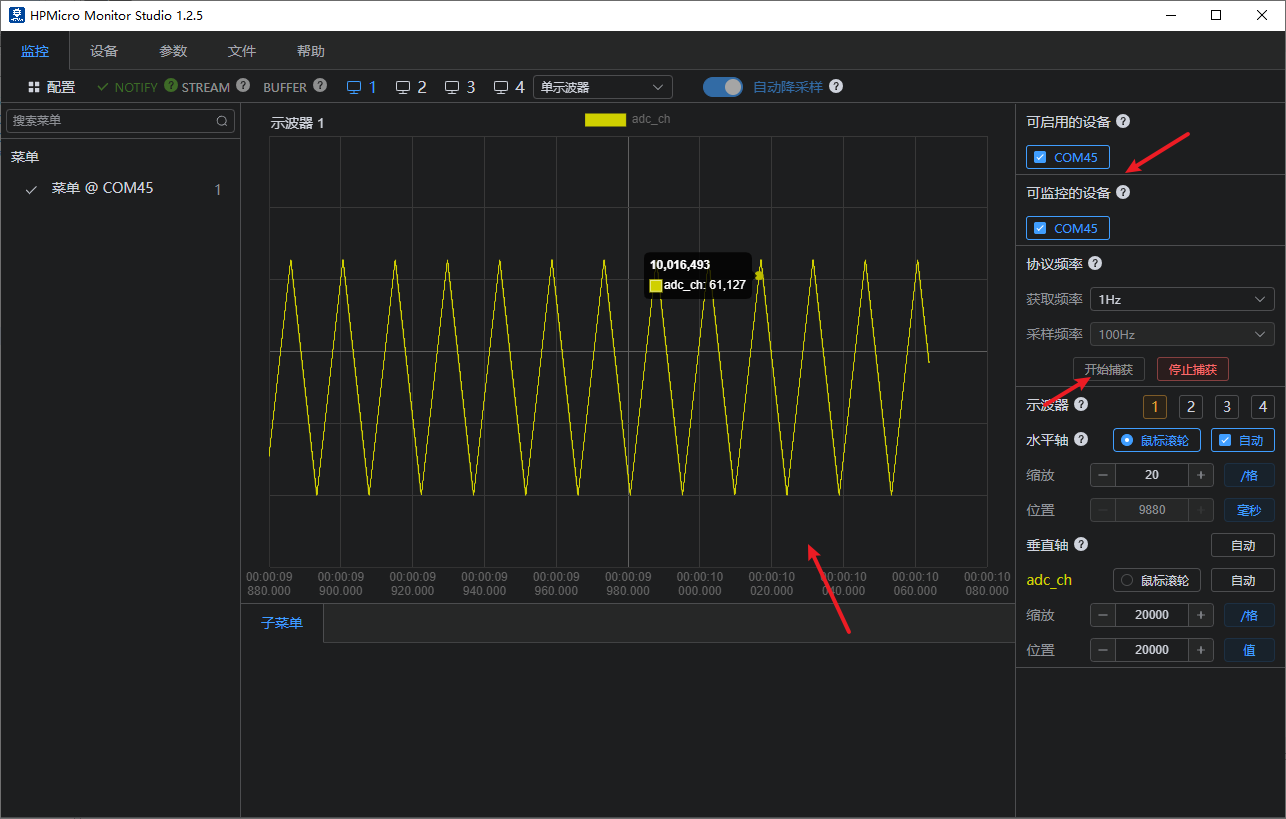
The HPM6200EVK runs the DAC example program, directly generating a triangle wave, while the HPM6300EVK’s ADC performs data acquisition.

21.11. Project Operation
Run the project.
Use Serial Port Assistant to check for error logs.
Run the HP MicroMonitor Studio tool on the PC.
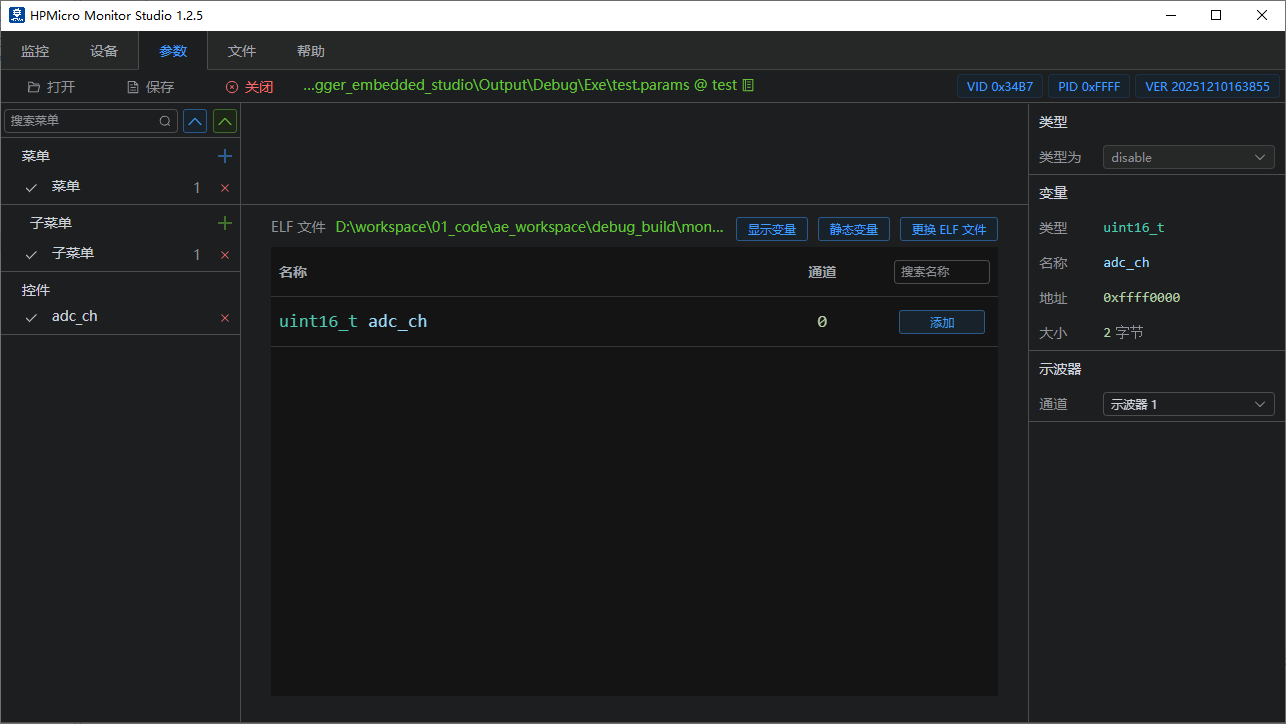
Configure HP MicroMonitor Studio to sample adc_ch data and monitor the ADC waveform with an oscilloscope.
21.12. Host Computer Configuration
For detailed configuration, please refer to hpm_monitor Service Description
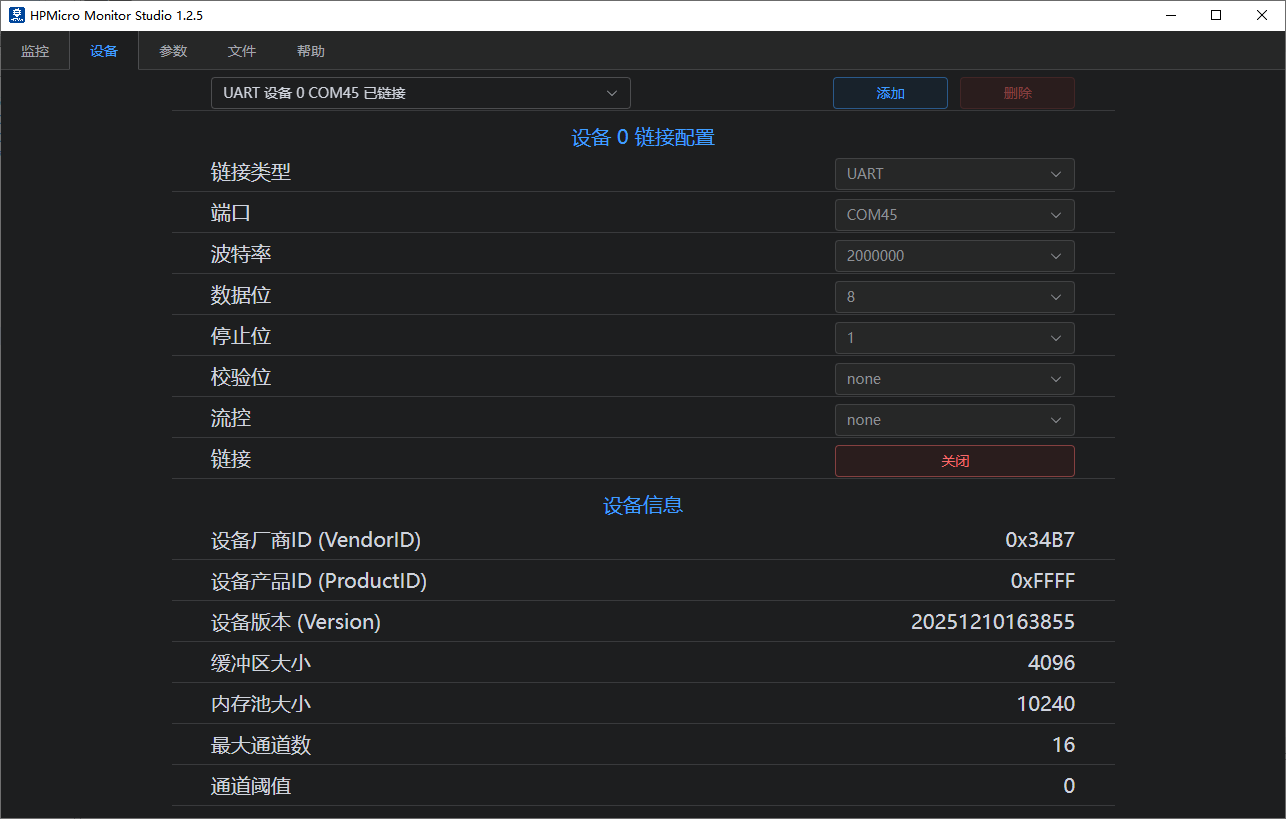
HPMicroMonitorStudio Config
Open the HPMicroMonitorStudio tool
Select the correct communication port (USB or COM port)
Set the baud rate (if using UART)
Connect the device
Waveform Display Configuration
Add waveform display
Select adc_ch
Start real-time display
21.13. Operational Effect
21.14. Important Notes
Waveform frame loss indicates packet loss or other transmission issues. The performance of the HPMicroMonitorStudio tool is still undergoing continuous optimization; it is advisable to reduce the ADC sampling frequency appropriately.