Depend on SDK1.10.0
Introduction
-This solution demonstrates how to achieve high-performance ADC sampling on Xianji Semiconductor MCU microcontrollers, transmitting data in real-time to a PC host via the hpm_monitor service for waveform display and analysis.
-The HPM6300 series supports three 16-bit ADC converters capable of converting analog signals from external pins and internal chip sources. When set to 16-bit resolution, the ADC achieves a maximum sampling rate of 2 MSPS; at 12-bit resolution, the maximum sampling rate reaches 4 MSPS. The ADC supports read conversion mode, cyclic conversion mode, sequential conversion mode, and interrupt conversion mode.
-This solution uses the HPM6300 development board as an example to demonstrate how to implement high-speed ADC sampling. It transmits the sampled data in real-time to the HPMicroMonitorStudio tool on a PC via the hpm_monitor service for waveform display. The solution employs interrupt-triggered conversion mode with PWM triggering and utilizes DMA for automatic data transfer, achieving efficient data acquisition and transmission.
Features of the Solution
- High-Performance Data Acquisition:
- Supports 16-bit ADC sampling up to 2MSPS
- Utilizes PWM triggering for precise, controllable sampling timing
- DMA-automated data transfer with zero CPU intervention
- Real-Time Data Monitoring:
- Transmits ADC data in real-time via hpm_monitor service
- Supports both USB and UART communication interfaces
- Low-latency, high-bandwidth data transmission
- Flexible Data Processing:
- Supports multiple sampling modes (Notify/Stream/Buffer)
- Customizable data reporting frequency and format
- Supports multi-channel monitoring
- User-Friendly:
- Real-time waveform display via PC graphical interface
- Parameters adjustable in real time
Block Diagram and Call Flow
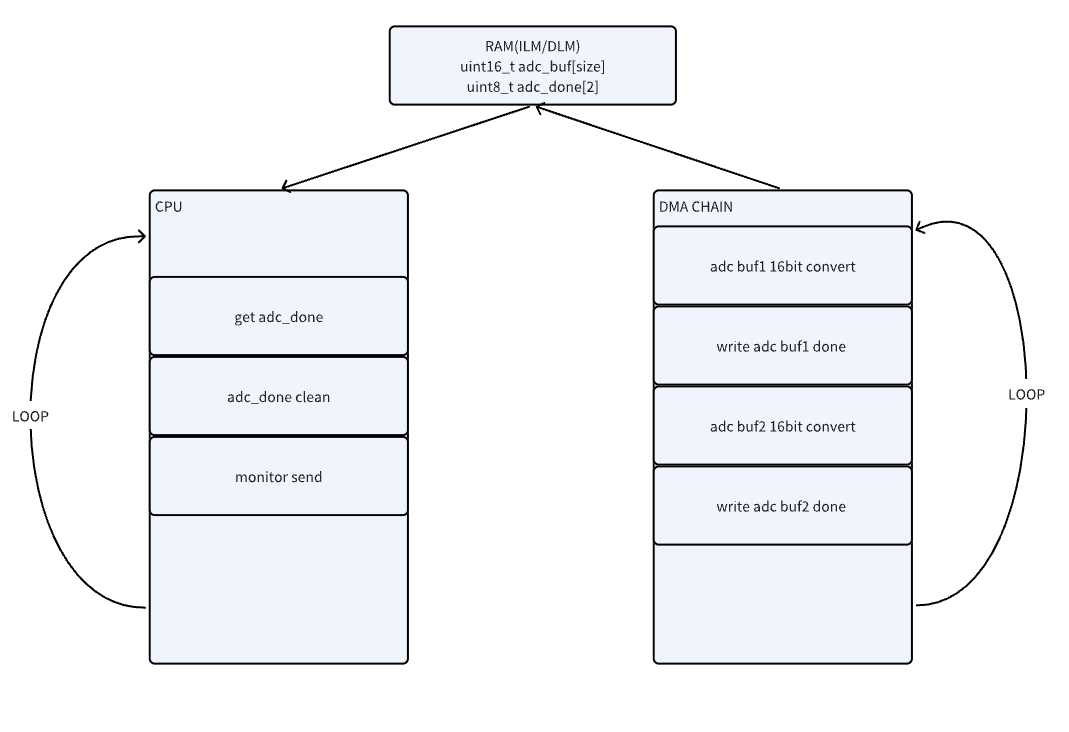
Hardware Configuration
- Development Board Support Supports the full range of HPM EVK development boards. Currently validated with HPM6300EVK; other EVKs require manual program or pin adjustments.
- Communication Interface Selection
- USB CDC: Recommended for high bandwidth and convenient connectivity
- UART: Optional, supports up to 10Mbps baud rate
Software Configuration
- Engineering Configuration (CMakeLists.txt)
# Copyright (c) 2021 HPMicro
# SPDX-License-Identifier: BSD-3-Clause
cmake_minimum_required(VERSION 3.13)
set(APP_VERSION_STRING "\"1.10.0\"")
set(RV_ARCH "rv32imafc")
set(RV_ABI "ilp32f")
# set(SES_TOOLCHAIN_VARIANT "Andes")
# set(CONFIG_HPM_MATH 1)
# set(CONFIG_HPM_MATH_DSP 1)
# set(HPM_MATH_DSP_SES_LIB "libdspf")
set(CONFIG_A_HPMMONITOR 1)
# set(CONFIG_MONITOR_INTERFACE "uart")
set(CONFIG_MONITOR_INTERFACE "usb")
# set(CONFIG_MONITOR_INTERFACE "enet")
if("${CONFIG_MONITOR_INTERFACE}" STREQUAL "uart")
elseif("${CONFIG_MONITOR_INTERFACE}" STREQUAL "usb")
set(CONFIG_CHERRYUSB 1)
set(CONFIG_USB_DEVICE 1)
set(CONFIG_USB_DEVICE_CDC 1)
elseif("${CONFIG_MONITOR_INTERFACE}" STREQUAL "enet")
set(CONFIG_LWIP 1)
set(CONFIG_ENET_PHY 1)
set(APP_USE_ENET_PORT_COUNT 1)
#set(APP_USE_ENET_ITF_RGMII 1)
#set(APP_USE_ENET_ITF_RMII 1)
#set(APP_USE_ENET_PHY_DP83867 1)
#set(APP_USE_ENET_PHY_RTL8211 1)
#set(APP_USE_ENET_PHY_DP83848 1)
set(APP_USE_ENET_PHY_RTL8201 1)
if(NOT DEFINED APP_USE_ENET_PORT_COUNT)
message(FATAL_ERROR "APP_USE_ENET_PORT_COUNT is undefined!")
endif()
if(NOT APP_USE_ENET_PORT_COUNT EQUAL 1)
message(FATAL_ERROR "This sample supports only one Ethernet port!")
endif()
if (APP_USE_ENET_ITF_RGMII AND APP_USE_ENET_ITF_RMII)
message(FATAL_ERROR "This sample doesn't support more than one Ethernet phy!")
endif()
endif()
find_package(hpm-sdk REQUIRED HINTS $ENV{HPM_SDK_BASE})
sdk_ld_options("-lm")
# sdk_compile_options("-O2")
if("${CONFIG_MONITOR_INTERFACE}" STREQUAL "uart")
sdk_compile_definitions("-DCONFIG_UART_CHANNEL=1")
sdk_compile_definitions("-DCONFIG_USE_CONSOLE_UART=1")
sdk_compile_definitions("-DCONFIG_MONITOR_DBG_LEVEL=0")
elseif("${CONFIG_MONITOR_INTERFACE}" STREQUAL "usb")
sdk_compile_definitions("-DCONFIG_USB_CHANNEL=1")
elseif("${CONFIG_MONITOR_INTERFACE}" STREQUAL "enet")
sdk_compile_definitions("-DCONFIG_ENET_CHANNEL=1")
sdk_inc(inc/enet)
endif()
sdk_compile_definitions("-DHPM_MONITOR_ENABLE=1")
project(hpm_monitor_adc)
sdk_inc(../common/adc)
sdk_inc(inc)
sdk_inc(inc/config)
sdk_app_src(src/main.c)
sdk_app_src(../common/adc/adc_16_pmt.c)
add_subdirectory(../../../../ hpm_apps/build_tmp)
generate_ses_project()
- MONITOR Config (monitor_config.h)
#define MONITOR_PID (0xFFFF)
#define MONITOR_VID (0x34B7)
#define MONITOR_PROFILE_MAXSIZE (4096)
#define MONITOR_MEM_SIZE (10*1024)
#define CONFIG_MONITOR_PRINTF(...) printf(__VA_ARGS__)
#ifndef CONFIG_MONITOR_DBG_LEVEL
#define CONFIG_MONITOR_DBG_LEVEL MONITOR_DBG_INFO
#endif
#if defined(CONFIG_UART_CHANNEL) && CONFIG_UART_CHANNEL
#define MONITOR_UART_DMA_ENABLE
#ifndef CONFIG_USE_CONSOLE_UART
#define MONITOR_UART_BASE HPM_UART2
#define MONITOR_UART_CLK_NAME clock_uart2
#define MONITOR_UART_IRQ IRQn_UART2
#define MONITOR_UART_BAUDRATE (2000000UL)
#ifdef MONITOR_UART_DMA_ENABLE
#define MONITOR_UART_TX_DMA_REQ HPM_DMA_SRC_UART2_TX
#define MONITOR_UART_RX_DMA_REQ HPM_DMA_SRC_UART2_RX
#endif
#else
#define MONITOR_UART_BASE BOARD_CONSOLE_UART_BASE
#define MONITOR_UART_CLK_NAME BOARD_CONSOLE_UART_CLK_NAME
#define MONITOR_UART_IRQ BOARD_CONSOLE_UART_IRQ
#define MONITOR_UART_BAUDRATE BOARD_CONSOLE_UART_BAUDRATE
#ifdef MONITOR_UART_DMA_ENABLE
#define MONITOR_UART_TX_DMA_REQ BOARD_CONSOLE_UART_TX_DMA_REQ
#define MONITOR_UART_RX_DMA_REQ BOARD_CONSOLE_UART_RX_DMA_REQ
#endif
#endif
#ifdef MONITOR_UART_DMA_ENABLE
#define MONITOR_UART_DMA_CONTROLLER HPM_HDMA
#define MONITOR_UART_DMAMUX_CONTROLLER HPM_DMAMUX
#define MONITOR_UART_TX_DMA_CHN (0U)
#define MONITOR_UART_RX_DMA_CHN (1U)
#define MONITOR_UART_TX_DMAMUX_CHN DMA_SOC_CHN_TO_DMAMUX_CHN(MONITOR_UART_DMA_CONTROLLER, MONITOR_UART_TX_DMA_CHN)
#define MONITOR_UART_RX_DMAMUX_CHN DMA_SOC_CHN_TO_DMAMUX_CHN(MONITOR_UART_DMA_CONTROLLER, MONITOR_UART_RX_DMA_CHN)
#define MONITOR_UART_DMA_IRQ IRQn_HDMA
#endif
#endif
#if defined(CONFIG_USB_CHANNEL) && CONFIG_USB_CHANNEL
#define CONFIG_USB_POLLING_ENABLE
#define MONITOR_USB_BASE CONFIG_HPM_USBD_BASE
#define MONITOR_USB_BUSID 0
#define MONITOR_USB_IRQ CONFIG_HPM_USBD_IRQn
#define MONITOR_USB_PRIORITY 2
#endif
Core Code Implementation
- Define the trigger source PWM for the ADC and the interconnect manager used.
#define BOARD_APP_ADC16_PMT_PWM HPM_PWM0
#define BOARD_APP_ADC16_PMT_TRGM HPM_TRGM0
#define BOARD_APP_ADC16_PMT_TRGM_IN HPM_TRGM0_INPUT_SRC_PWM0_CH8REF
#define BOARD_APP_ADC16_PMT_TRGM_OUT TRGM_TRGOCFG_ADCX_PTRGI0A
- Define the ADC sampling rate and the data length per transmission.
#define APP_ADC16_DMA_BUFF_LEN_IN_BYTES (1024U)
#define APP_ADC16_TCP_SEND_SIZE (APP_ADC16_DMA_BUFF_LEN_IN_BYTES*sizeof(uint16_t))
- User-Defined Channel Definition
#define APP_ADC16_DMA_BUFF_LEN_IN_BYTES
APP_ADC16_DMA_BUFF_LEN_IN_BYTES:DMA BUFF size for storing ADC16 sampling data. ;存放ADC16采样数据的DMA BUFF大...
Definition: adc_16_pmt.h:29
#define ADC_SAMPLE_FREQ
Definition: main.c:15
MONITOR_DEFINE_GLOBAL_VAR(adc_ch, 0, uint16_t,(100000UL), APP_ADC16_DMA_BUFF_LEN_IN_BYTES)
- MONITOR sends ADC samples
{
{
printf("adc dual buff full up!\r\n");
}
{
}
else if (
adc_get_done(1) && monitor_report_ch_is_released(0))
{
}
}
uint8_t adc_get_done(uint8_t index)
adc_done flag clear: when adc_done flag is 1, corresponding to the adc_buff data will be sent out via...
Definition: adc_16_pmt.c:457
uint8_t * adc_get_buf_addr_point(uint8_t index)
get the starting address for sending data. ;获取发送数据的起始地址
Definition: adc_16_pmt.c:462
void adc_clear_done(uint8_t index)
adc_done flag clear: when adc_done flag is cleared, corresponding to the adc_buff data will be sent o...
Definition: adc_16_pmt.c:452
static void monitor_adc_handle(void)
Definition: main.c:18
- DEMO Example
{
board_init();
printf("monitor adc demo!\r\n");
printf("__DATE__:%s, __TIME__:%s\r\n", __DATE__, __TIME__);
monitor_init();
while (1)
{
monitor_handle();
}
return 0;
}
void adc_pmt_auto_config(uint32_t sample_freq)
ADC preemption conversion mode configuration, including ADC pin initialization, ADC clock initializat...
Definition: adc_16_pmt.c:438
int main(void)
Definition: main.c:36
Project Path
- Project Path:monitor_adc/software/hpm_monitor
Engineering Construction
- Building projects on Windows

- Linux Project Build and Compilation
//Switch to the sample application directory
cd hpm_apps\apps\monitor_adc\software\hpm_monitor
//Create the build directory
mkdir build
//Switch directory to"build"
cd build
//Ninja-build
cmake -GNinja -DBOARD=hpm6300evk -DCMAKE_BUILD_TYPE=flash_xip ..
//build
ninja
Hardware Configuration
- This solution uses the hpm6300evk board.
- Users may employ other EVK boards, but must modify corresponding pins accordingly.
- Connect the hpm6300evk to a PC via USB/UART.
- Connect the hpm6300evk ADC pin to the hpm6200evk DAC pin (digital-to-analog conversion).
- The HPM6200EVK runs the DAC example program, directly generating a triangle wave, while the HPM6300EVK's ADC performs data acquisition.

Project Operation
- Run the project.
- Use Serial Port Assistant to check for error logs.
- Run the HP MicroMonitor Studio tool on the PC.
- Configure HP MicroMonitor Studio to sample adc_ch data and monitor the ADC waveform with an oscilloscope.
Host Computer Configuration
For detailed configuration, please refer to [hpm_monitor Service Description](hpm_monitor_instruction_zh)
- HPMicroMonitorStudio Config
- Open the HPMicroMonitorStudio tool
- Select the correct communication port (USB or COM port)
- Set the baud rate (if using UART)
- Connect the device
- Waveform Display Configuration
- Add waveform display
- Select adc_ch
- Start real-time display
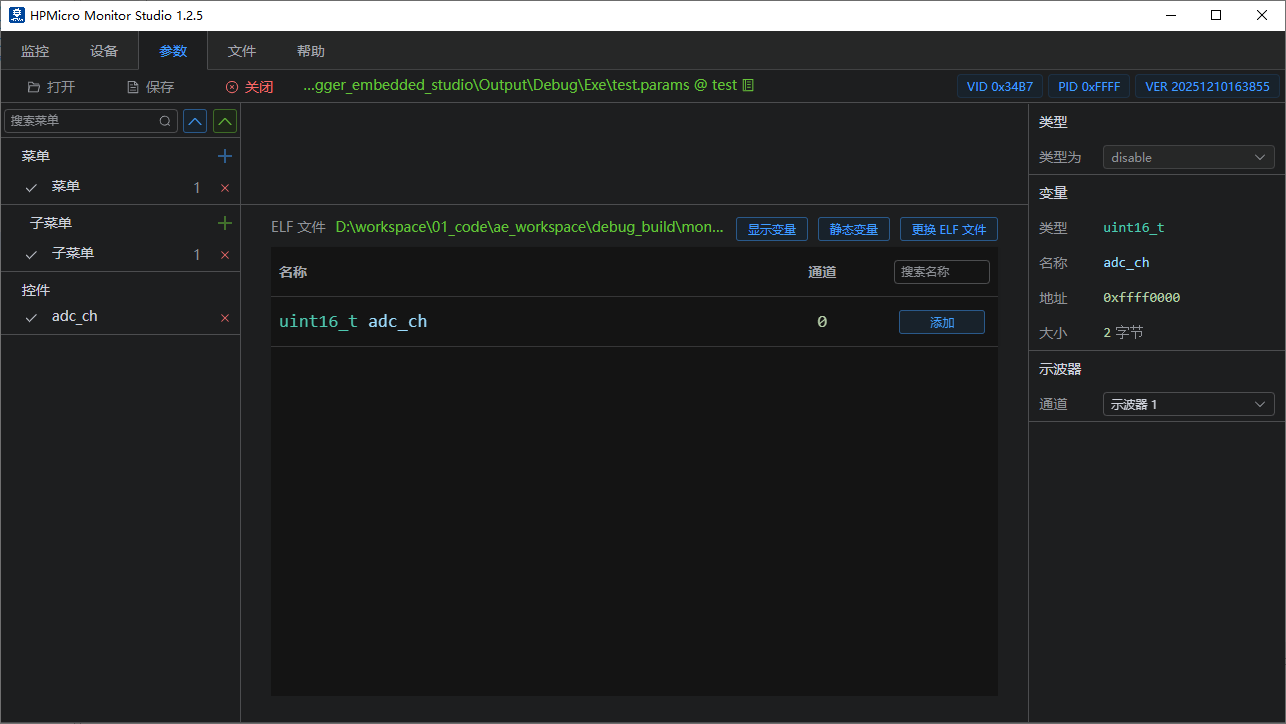

Operational Effect

Important Notes
- Waveform frame loss indicates packet loss or other transmission issues. The performance of the HPMicroMonitorStudio tool is still undergoing continuous optimization; it is advisable to reduce the ADC sampling frequency appropriately.
Licensing
HPM APP is permissively licensed using the BSD 3-clause license

 1.9.1
1.9.1